Configuration Overview
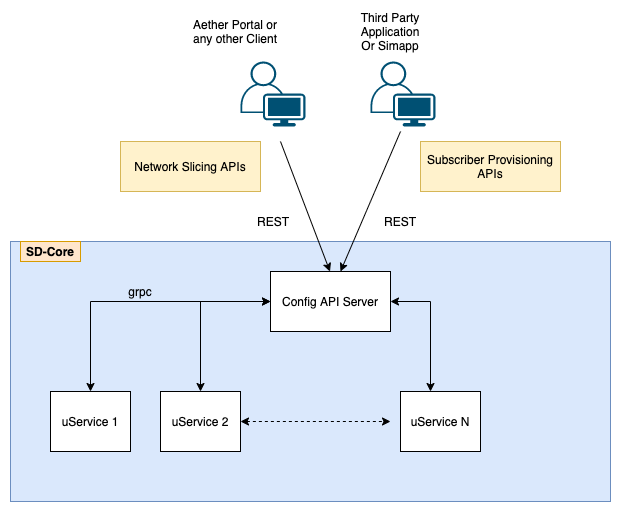
SD-Core has been developed with a cloud-based deployment and consumption model as its foundation. It provides a rich and extensible set of APIs to enable runtime configurability of subscriber management, access management, session management, and network slice management. This configuration can be conducted via ONF’s Runtime Operational Control (ROC) platform directly for consumption as a cloud-managed service, or the APIs can be used by third-party automation and management platforms.
Reference Helm Charts
SD-Core Helm charts are available in the following repository:
Sub-components in sdcore-helm-charts:
omec-control-plane: 4G network function Helm charts5g-control-plane: 5G network function Helm chartsomec-sub-provision: Simapp Helm charts5g-ran-sim: gNBSim Helm charts
Configuration Methods
SD-Core supports two methods to configure network functions and microservices:
Helm Chart Configuration
Each network function and microservice has its own Helm chart
Users provide override values and deploy network functions according to their requirements
Use the appropriate Helm charts with override values to install 4G/5G network functions
REST Configuration Interface
Basic static configuration is provided through Helm charts (e.g., logging level, images)
Dynamic Network Slice management APIs are available through a REST interface
REST APIs enable creation, modification, and deletion of network slices
REST APIs also support subscriber provisioning and grouping subscribers into device groups
Note
Simapp is an example implementation of REST interface-based configuration for provisioning subscribers in SD-Core
Simapp is also used to provision network slices in SD-Core in the absence of a portal
Aether ROC Portal uses the REST interface to configure network slices in SD-Core
Configuration Steps
This section describes the high-level configuration steps from ROC/Simapp. The ConfigPod stores this configuration and publishes it to respective clients over REST/gRPC.
Step 1: Provision Subscribers in 4G/5G Subsystem
Can be done only through Simapp
Configure IMSI (International Mobile Subscriber Identity) in SD-Core
Configure security keys for each subscriber
Subscribers can be created during system startup or at runtime
Step 2: Device Group Configuration
Group multiple devices under a device group
Configure QoS (Quality of Service) for the device group
Configure IP domain settings for the device group (e.g., MTU, IP pool, DNS server)
Step 3: Network Slice Configuration
Create a network slice
Add device groups to the network slice
Configure slice-level QoS settings
Configure site information including UPF, eNBs/gNBs assigned to the slice
Define applications allowed to be accessed by this slice (see Application Filtering Overview)
Note
Step 1 can only be performed through Simapp. Refer to Simapp override values.
Steps 2 and 3 can be performed through either Simapp or ROC. Simapp has an option to create network slices. Look for the configuration parameter
provision-network-slice: falsein the Simapp configuration.
Note
If UPF is used to allocate UE address allocation then even if you have specified UE address pool in the slice config, you still need to add the address pool configuration in the UPF deployment.
4G and 5G Configuration Differences
One of the most important differences between 4G and 5G configuration relates to network slicing. 5G includes network slice IDs in 3GPP-defined protocol messages, whereas 4G does not. In 4G, we implement slicing using APNs (Access Point Names). Key differences include:
Slice ID
Since 4G does not include slice IDs in protocol messages, configured slice IDs are ignored in 4G components. This means duplicate slice IDs will not cause issues in 4G. However, it’s still best practice to use unique slice IDs per slice for consistency.
APN/DNN Configuration
In 4G, each slice should have a separate APN. This is required because the APN serves as the slice identifier internally in 4G modules. In 5G, this restriction doesn’t apply because 5G uses both slice ID and DNN (Data Network Name). As a best practice, keep APNs/DNNs unique per slice so the same configuration works for both 4G and 5G.
DNN/APN in Initial Attach/Register Message
In 4G, if a UE sends a random APN, the MME overrides it based on the user profile in HSS. This means the connection succeeds even if the APN doesn’t match the configured value.
In 5G, the APN name and Slice ID from the UE are used to select the SMF, so the UE must be configured with the correct APN/DNN name. The core network sends allowed slice IDs to the UE in the registration accept message.